Start with today
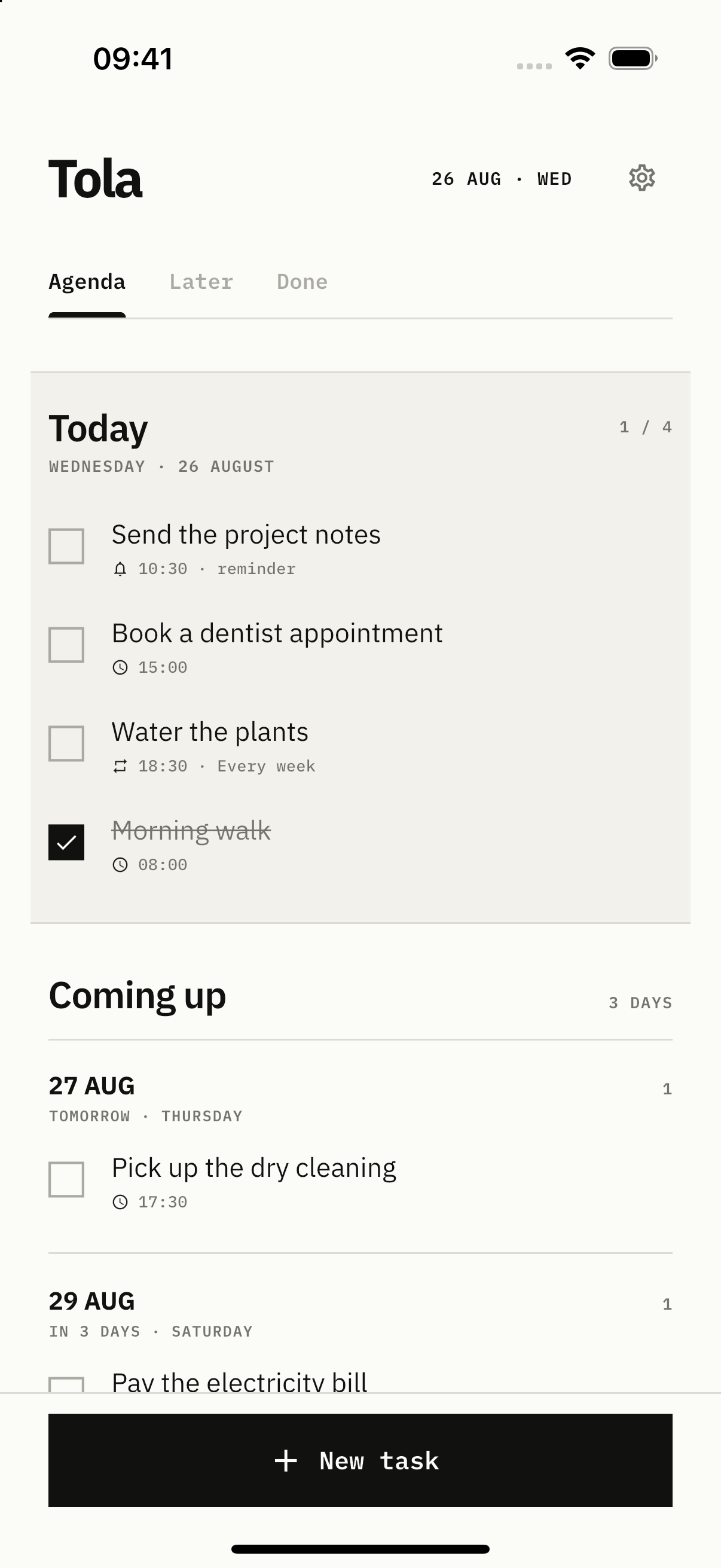
See overdue, today, and upcoming tasks at a glance.
A SIMPLE TODO LIST
Write it down, add a date or reminder if needed, and keep Today and Later in their place.
iOS + Android · COMING SOON
MADE FOR EVERYDAY USE
Tola keeps only what you need.
See overdue, today, and upcoming tasks at a glance.
Keep unscheduled ideas in Someday.
Completed tasks stay in the archive.
HOW IT WORKS
Add a date or reminder when needed. Otherwise, leave it in Someday.
See what is left today.
THE USEFUL BITS
Complete overdue tasks or move them yourself.
Repeat by day, week, month, or your own schedule.
Set a time to be reminded. Everything else stays quiet.
Switch between light Paper and dark Ink.
YOUR DATA
Add, edit, and complete tasks offline.
QUESTIONS
It is in development. Store links will appear here when ready.
No. Open the app and start.
Yes. Everyday actions work offline.
Not in the first version. There is no cross-device sync.
TOLA · TODAY + LATER
Tola is coming to iOS and Android.
iOS + Android · COMING SOON